🔌 Integrations

🔐 Authentication

OpenID connect (OIDC)

With OpenID connect, CertBob allows the interactive authentication of users via an existing OIDC IdP (SSO).

Hint

To configure OIDC, set the following variables:

Local authentication

CertBob also allows for interactive authentication of local users.

Hint

To configure local users / authentication, set the LOCAL_USERS variable.

Note

If possible always use OpenID connect (OIDC), or any other authentication mechanism.

✉️ Email (SMTP)

Instead of providing the certificates as download, CertBob can also send the certificates via email. This works interactively over the web interface, and also for 3rd-party integrations such as Mattermost.

Hint

To configure email / SMTP, use the following variables:

🧩 3rd-party

Mattermost

Mattermost provides custom Slash commands, which are leveraged by CertBob to issue new certificates.

With this integration, Mattermost users (aka employees) who are already authenticated can easily obtain new certificates, without additional external authentication.

Hint

To configure Mattermost, set the MATTERMOST_TOKEN.

Note

The CertBob & Mattermost communication works like this:
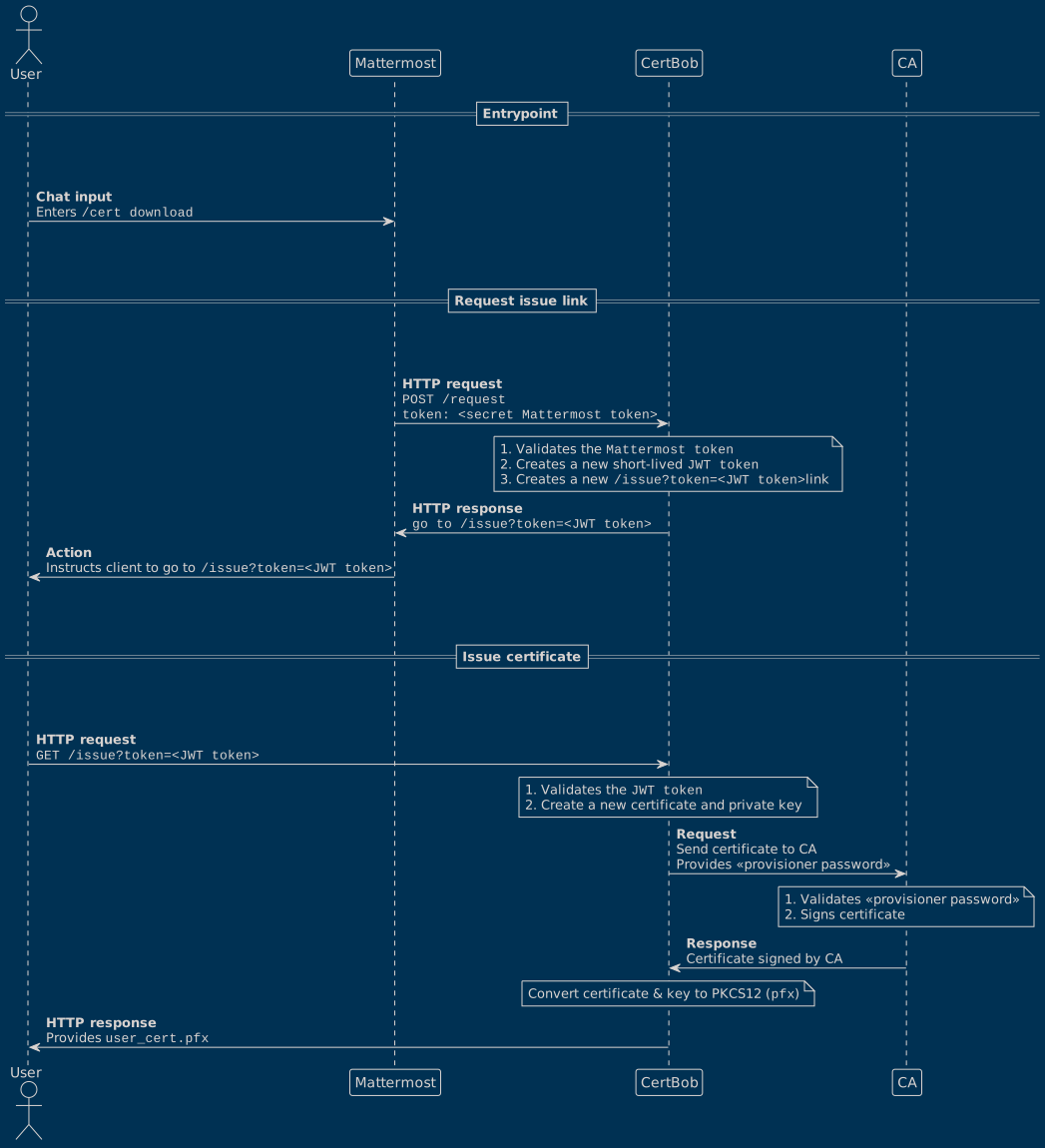
!theme blueprint

@startuml
actor User

==Entrypoint==
||50||

User -> Mattermost : **Chat input**\nEnters ""/cert download""

||50||
==Request issue link==
||50||

Mattermost -> CertBob : **HTTP request**\n""POST /request""\n""token: <secret Mattermost token>""

note over CertBob
    1. Validates the ""Mattermost token""
    2. Creates a new short-lived ""JWT token""
    3. Creates a new ""/issue?token=<JWT token>"" link
end note

CertBob -> Mattermost : **HTTP response**\n""go to /issue?token=<JWT token>""

Mattermost -> User : **Action**\nInstructs client to go to ""/issue?token=<JWT token>""

||50||
==Issue certificate==
||50||

User -> CertBob : **HTTP request**\n""GET /issue?token=<JWT token>""

note over CertBob
    1. Validates the ""JWT token""
    2. Create a new certificate and private key
end note

CertBob -> CA: **Request**\nSend certificate to CA\nProvides «provisioner password»

note over CA
    1. Validates «provisioner password»
    2. Signs certificate
end note

CA -> CertBob: **Response**\nCertificate signed by CA

note over CertBob
    Convert certificate & key to PKCS12 (""pfx"")
end note

CertBob -> User: **HTTP response**\nProvides ""user_cert.pfx""
@enduml